- Home
- Pro crosshairs
- chelo
CS2 · 2026 · Imperial Esports
chelo crosshair code 2026
The crosshair chelo used before CS2’s September 2026 crosshair update, converted to a new CS share code at chelo’s own resolution, 1280×960 black bars. It is pixel-identical to the old one, so you can import it as is.
- Pixel-identical
- New CS2 code
- 1280×960 black bars
CSQJeNG5qzchphRNdhc6NvcjqNPdmTcu5d5zeGu5DaMBZh
cl_crosshair_screen_height 960; cl_crosshairstyle 4; cl_crosshair_length 6; cl_crosshair_thickness 3; cl_crosshair_gap 4; cl_crosshairdot 0; cl_crosshair_t 0; cl_crosshair_recoil 0; cl_crosshair_drawoutline 0; cl_crosshaircolor_r 0; cl_crosshaircolor_g 255; cl_crosshaircolor_b 0; cl_crosshaircolor_a 200
CSGO-ODCwe-rkaoY-o2GFa-JGzqx-adywQThe new code stores chelo’s screen height, so CS2 rescales it if you play at another resolution. Want to change something first? Open it in the generator.
Before vs after
Pixel-identical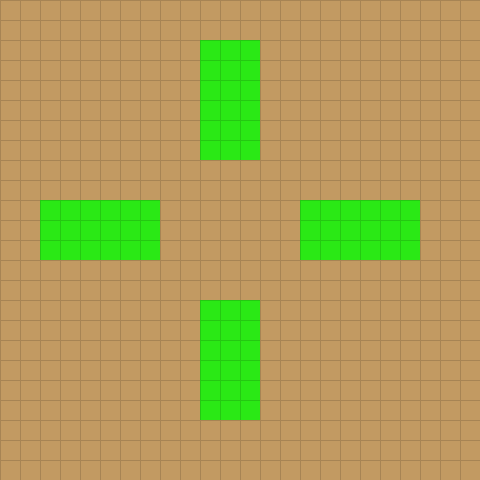 Before
 Old game, 1280×960Classic Static · size 3 · thickness 1.5 · gap -2
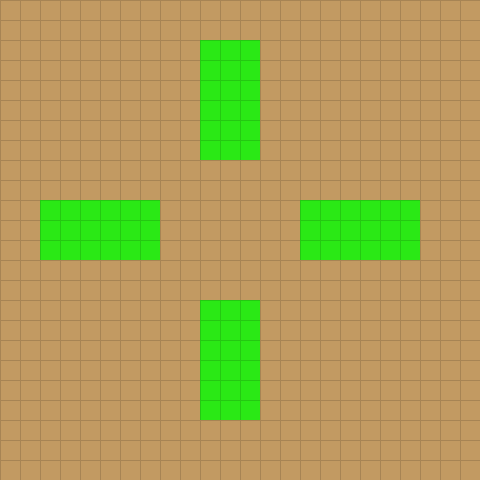 New code
 New code in CS2 nowStatic Cross · length 6 px · thickness 3 px · gap 4 px
Zoomed 20×: one square is one screen pixel at 1280×960. The small squares are actual size.
Settings
| Setting | Old | New |
|---|---|---|
| Style | Classic Static | Static Cross |
| Length (old: size) | 3 | 6 px |
| Thickness | 1.5 | 3 px |
| Gap | -2 | 4 px |
| Dot | No | No |
| T style | No | No |
| Outline | Off | None |
| Colour | Custom (0, 255, 0) | 0, 255, 0 |
| Alpha | 200 | 200 |
| Screen height | — | 960 |
Profile
chelo’s crosshair and settings
About this crosshair
chelo’s crosshair is a static cross: 6 px lines, 3 px thick, a 4 px gap, green (0, 255, 0) at 200/255 opacity, no outline. Those are pixels at chelo’s resolution, 1280×960 black bars. On a 1920×1080 screen CS2 draws this code with 7 px lines, 3 px thick, and a 5 px gap. Measured at 1080p, of the other 36 pro crosshairs on CrosshairGen 36 are smaller, none are larger and none are the same size.
Closest pro crosshairs
- ZywOo crosshair · Team Vitality
- karrigan crosshair · Falcons Esports
- Perfecto crosshair · Virtus.pro
Sensitivity and video
| Team | Imperial Esports |
|---|---|
| Resolution | 1280×960 black bars |
| DPI | 400 |
| Sensitivity | 4 |
| eDPI | 1600 |
| Zoom sensitivity | 1 |
| Polling rate | 1000 Hz |
From the same archived prosettings.net page as the crosshair, 11 Apr 2026.
How to use it
Import chelo’s crosshair in CS2
- Copy the new codeClick “Copy new code” above. It starts with
CSand has no dashes. - Open crosshair settingsIn CS2 open Settings → Crosshair/Scopes and click Share or Import.
- Paste and importPaste the code, click Import and check the preview. Prefer the console? Paste the command instead.
Why the old CSGO- code no longer imports, and other ways to apply a crosshair: full import guide · FAQ.
FAQ
Questions about chelo’s crosshair
What is chelo’s crosshair code in CS2?
chelo’s crosshair as a new CS2 code is CSQJeNG5qzchphRNdhc6NvcjqNPdmTcu5d5zeGu5DaMBZh. It is converted from chelo’s pre-update code (CSGO-ODCwe-rkaoY-o2GFa-JGzqx-adywQ) at 1280×960 black bars and matches it pixel for pixel. Paste it in CS2 under Settings → Crosshair → Share or Import.
What sensitivity does chelo use in CS2?
400 DPI at 4 in-game sensitivity, which is 1600 eDPI, with zoom sensitivity 1 and a 1000 Hz polling rate (prosettings.net, archived 11 Apr 2026).
What resolution does chelo play on?
1280×960 black bars. The new code stores a screen height of 960, so CS2 rescales the crosshair if you play at a different resolution.
Source
Where this code comes from
The old code and resolution are from chelo’s settings page on prosettings.net as archived on 11 Apr 2026, before the update (archived copy). The team is as listed there at that time.
The new code was generated from that old code by the same engine the converter uses, at 1280×960. Pros change their settings often, so check chelo’s current settings as well.
More pro crosshair codes
 donk crosshairTeam Spirit
 ZywOo crosshairTeam Vitality
 s1mple crosshairBC.Game
 m0NESY crosshairFalcons Esports
 NiKo crosshairFalcons Esports
 ropz crosshairTeam Vitality
 sh1ro crosshairTeam Spirit
 Twistzz crosshairFaZe Clan
 device crosshair100 Thieves
 electroNic crosshairBC.Game
 frozen crosshairFaZe Clan
 jL crosshairTeam Vitality
 b1t crosshairNatus Vincere
 broky crosshairFaZe Clan
 Ax1Le crosshair1WIN
 YEKINDAR crosshairFURIA
 w0nderful crosshairNatus Vincere
 jimpphat crosshairAurora
 flameZ crosshairTeam Vitality
 karrigan crosshairFalcons Esports
 FalleN crosshairFURIA
 KSCERATO crosshairFURIA
 yuurih crosshairFURIA
 molodoy crosshairFURIA
 skullz crosshairImperial Esports
 insani crosshairMIBR
 biguzera crosshairpaiN Gaming
 Perfecto crosshairVirtus.pro
 zont1x crosshairTeam Spirit
 magixx crosshairTeam Spirit
 Jame crosshairPARIVISION
 Boombl4 crosshairBetBoom Team
 arT crosshairLegacy
 saffee crosshairpaiN Gaming
 drop crosshairRED Canids
 HEN1 crosshairGaimin Gladiators
Like CrosshairGen?
Buy me a coffee ☕
CrosshairGen is free, has no ads and collects nothing. Every time CS2 changes the crosshair, it gets updated. A coffee is what keeps that going.
One-off tip via Ko-fi.